A New AV Installation
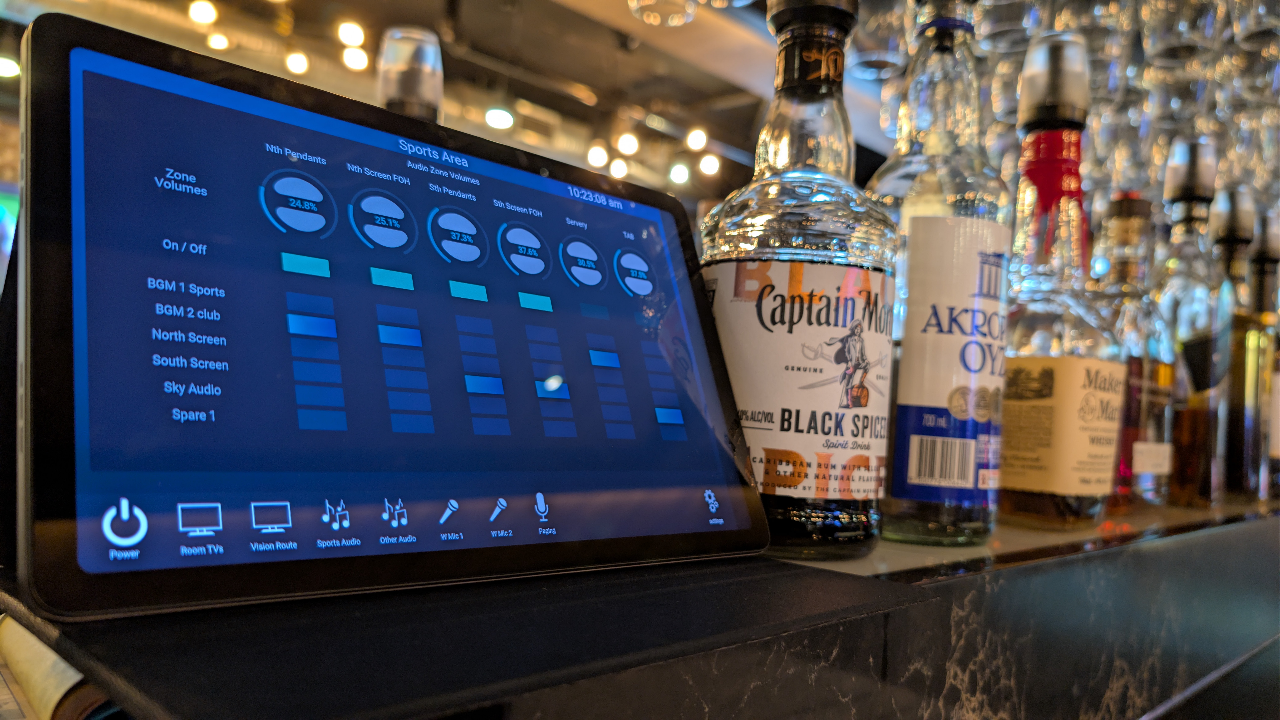
Deciding on a new AV system for your business can feel like a headache. Between screens, audio gear, speakers, amps, wireless mics, zoom cameras, video walls, projectors, racks, power units, and lighting, there is a lot to absorb. Then, all of this has to be tied back into a central control system.
This control is the system's heart and needs to be reliable, future-proof, easy to use, easy to replace, easy to edit, and easy to upgrade—without headaches or costing a fortune every time you want to make a change. In an ideal world, that comes standard. In reality, this is where you have to be careful, because a bad call here will cost you down the road. You really have to do your homework.
Let's talk about AV salespeople for a minute. Unfortunately, most of them are just pushing whatever brand or setup fits their agenda today. They don't have your best interests at heart. They also can figure out pretty quickly if you don't fully understand what you want out of a system. When they realise that, watch out—they will start to blind side you with complicated info, over-engineer the design, and justify why all these extra boxes are needed and why it's suddenly so expensive. Truth be told, they are more interested in selling you the newest "cutting-edge" shiny object than looking out for your long-term needs. If you mention products other AV reps have previously suggested, they will often tear down those ideas just to convince you that their way is the only right way. Be careful. That is why understanding the value of an independent approach is so crucial.
Here is what you are likely to deal with when talking to an AV rep, and how to handle it:
Dealing with AV people...
Stop the sales pitch in its tracks. Once you have a rough budget and a basic idea of what you want the system to do, force the conversation to focus on three things: control, usability, and long-term support.
AV salespeople love to blindside you with technical jargon and overwhelm you with options. To counter that, ask them straight up what they think the most important priorities should be, write their answers down, and use them to compare your options.
To help you vet your AV installers and cut through the noise, see below:
When speaking with an AV integrator or technical consultant, use this question to test their openness to modern, flexible architectures:
"We like the idea of using open languages like Python to build our AV setup on, as we want to avoid being locked into a proprietary ecosystem. Is this something you can do for us?"
How to Interpret Their Response
1. The Red Flag Response
"No, this is not possible."
What it reveals: This is a major warning sign. Python (and other standard text-based languages) is already becoming the go-to standard right now in 2026 and is widely accepted for AV control and automation use. A blanket denial usually indicates that the vendor either lacks the internal software engineering capability or has a commercial incentive to push a proprietary, closed-source product line.
2. The Traditional Integrator Response
"Well, that is only the control layer; a complete AV ecosystem involves a lot more moving parts..."
What it reveals: This response is generally honest and technically accurate. Control is indeed only one piece of the puzzle alongside signal routing, DSPs, UI design, and network infrastructure. However, traditional integrators often use this valid point as a pivot to justify sticking with legacy, vendor-locked hardware ecosystems (e.g., proprietary control processors) simply because it is what their sales and support teams already know. So yeh, another warning... You wont be seeing their hidden sign that says, "Welcome to Our Proprietary World"
2. Is a Proprietary World so Bad ?
"This all depends on how you look at things. When you go for a
"classic proprietary" system , they ussual have audio, touch panels and controllers
all falling under the same umbrella system, meaning they all depend on
each other to work semmlessly. Nothing wrong with that right ?
Let's see about that....
A real world example that is so common now that Pyaura cannot mention brand names
without causing legal issues. So lets create a fictional proprietary brand called XYZ
System XYZ Installed
This controls various TVs
and audio through out the place of business. There are 4 touch panels
installed. One for each area.
2 years later, something happens and 1 touch panel fails. Your AV supplier
sold you the last of the older stock. So, their vendor suppliers do not
sell that particular model anymore as they have newer models out to replace them.
[client] Ok then, so can we can just install the newer model touch panel ?
[XYZ installer] Not quite, they only work with the newer model controllers. You will need to
upgrade the controller too.
[client] Really ?
[XYZ installer] Oh yes and we need to replace the other 3 touch panels as well.
[client] What ?
[XYZ installer] Also the venue file will need changes done as this needs to suit the
requirements of the new controller....
and the audio.......
Not to mention the down time and the cost of this yet...
Do you understand where this is heading?
Pyaura System Installed
So this same
system also has 4 touch panels and controls the same equipment.
So a touch panel dies after 2 years, these things happen. Ok lets buy another.
Oh these are pretty common, they are a garden variety wireless touch panels.
Do we want perhaps a samsung , benq, phillips, greentouch, DSI, sunworld panel?
Yes, this is fantastic. Ok, found a suitable screen, it has arrived.
A little bit of set up configuration required on it , eg url and/or
lock out settings but set up is very straight forward otherwise.
No new controller etc..
Ok maybe your panel has a network cable going
to it ( wired ). Yes again. Android versions are common place.
They come with PoE enabled connections.
Not a problem.
Does this answer you question ?
1. Future-Proofing & Scalability
Technology changes fast. Ensure your investment won't be obsolete in two years.
-
Are the core components based on open standards or proprietary lock-ins?
Core components built on open standards give your organization direct ownership and flexibility, making the system easier to update, audit, and integrate with third-party building management systems. In contrast, proprietary lock-ins restrict you to a single vendor's ecosystem, often increasing long-term licensing costs and limiting your integration choices.
-
How easily can this setup scale if we expand?
A scalable setup relies on modular, flexible architectures rather than rigid, closed-source ecosystems. When evaluating scalability, ensure that adding new rooms, endpoints, or upgraded hardware will not require a complete rip-and-replace of your existing infrastructure, and confirm that the control system can easily accommodate future organizational growth.
2. Usability & User Experience (UX)
The most advanced technology is useless if your staff struggles to turn it on or connect a laptop.
- Can we see a live demonstration of the exact user interface (UI) proposed? (Avoid generic brochures; ask to see the actual touchscreen or button panel your staff will use.)
- How many steps does it take to do particular tasks? (It should ideally be a one-touch or automatic "walk-in, plug-in" experience.)
- Is the system intuitive enough for a first-time guest or temporary staff member to use without training? Simple menus and floor maps to indicate areas rather than just plain labels go a very long way.
3. Total Cost of Ownership & Transparency
The initial installation quote is rarely the final cost.
- Does this quote include ongoing licensing fees for control systems? This is a big issue for a lot of people. You are already spending a fortune on a system and they want more....really ?
- What are the expected lifecycle costs? (e.g., projector bulb replacements, battery backups, fan / filter maintenance) Yes there are things that will need attention, this depends on what you are buying.
- Are training sessions for our staff and IT team included in the initial installation cost? When a well designed system is in place, it should be intuitive to use. A little training in the cost goes a long way. Also, If you need a 200 page manual to operate it then there is something definately wrong here.
Key Takeaways for Your Evaluation
- Do your research. I cannot stress how important this is.
- Get multiple opinions. Just like when you go to the doctor. You may want more than one opinion
- Open vs. Proprietary Lock In: True open-source system gives you the advantage of have many brands of equipment available for use with your system. This is much better than locked into one brand only and also future proofs your system.
- Ultimate Flexibility: The benefits of using popular standard languages has many advantages.
- Pyaura is the way: This in itself sounds like a big sales pitch also but once you understand the inner workings of an AV system, this is when Pyaura truly makes absolute sense in this day and age.